
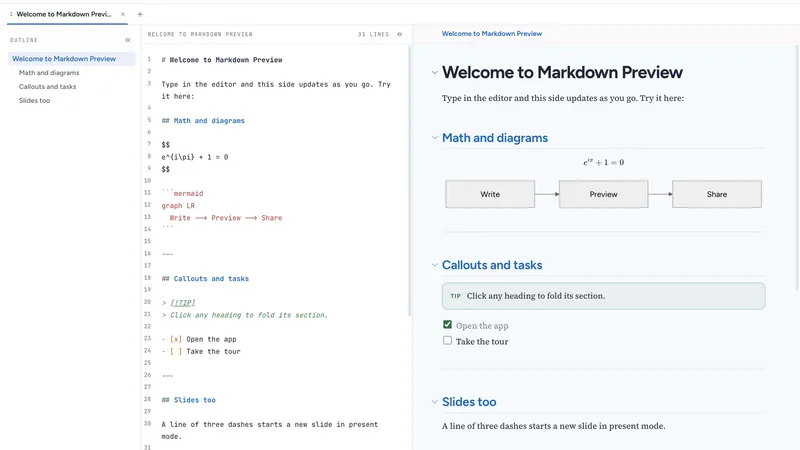
Markdown Preview is a free, private Markdown editor with a live preview. Everything stays on your device (IndexedDB), so there is no sign-up and no server storing your notes.
Features:
- GitHub Flavored Markdown, callouts, footnotes, frontmatter
- KaTeX math and Mermaid diagrams
- Syntax highlighting for 180+ languages
- Present mode: turn any doc into slides with speaker notes
- Open GitHub/GitLab files straight from a link
- Tabs, outline, auto snapshots, custom CSS
- Export to PDF, HTML or .md, or copy as rich text into Gmail, Docs or Slack
- Installable PWA, works offline
Free, no tiers, no watermark.
Why Markdown Preview
- Private by design: your documents are stored locally in your browser (IndexedDB). Nothing is uploaded, and there is no account to create.
- Works offline: install it as a PWA and keep writing without a connection.
- Paste anywhere: copy the rendered preview as rich text and paste it straight into Gmail, Google Docs or Slack with formatting intact.
Who it is for
Developers writing READMEs and docs, students and researchers working with math, technical writers, and anyone who takes notes in Markdown and wants a fast, clean live preview without sign-ups.
How to use it
- Open https://mdpreview.jignesh.dev/ in any modern browser.
- Start typing Markdown on the left and see the live preview on the right.
- Export to PDF, HTML or .md, present it as slides, or copy it as rich text.
Made by Jignesh Sanghani, a fullstack developer from India.


