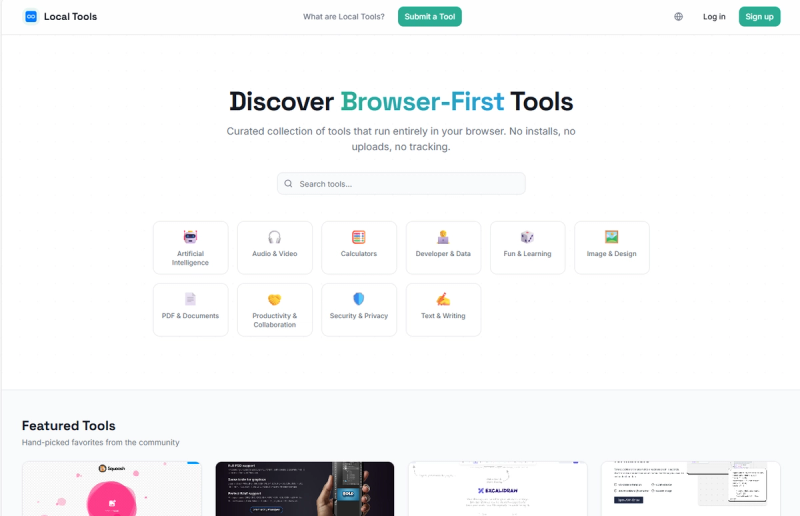
Local Tools is a curated directory of over 1,200 browser-first tools that run entirely in your browser without installations, uploads, or tracking.
What is Local Tools?
Local Tools is a free, community-driven collection of browser-based applications that execute locally on your device. It aggregates more than 1,200 tools across 11 categories including AI, Audio & Video, Calculators, Developer & Data, Fun & Learning, Image & Design, PDF & Documents, Productivity & Collaboration, Security & Privacy, and Text & Writing. Each tool has a dedicated page with a screenshot, description, rating, category tags, and a direct link to the tool's website. The platform is hosted at localtool.tech and encourages user submissions to expand the collection.
Key Features
- Privacy-first operation — All tools process data entirely in your browser; no information is uploaded to servers, ensuring complete local execution.
- No installations or sign-ups — Every tool is accessible instantly via a web link; no downloads, plugins, or accounts required.
- Wide tool variety — Over 1,200 tools covering diverse use cases: image compression (Squoosh), photo editing (Photopea), diagramming (Excalidraw), JSON visualization (JSON Crack), salary calculators, prompt engineering tools, and more.
- Community submissions — Users can contribute new tools, fostering a growing ecosystem of browser-based utilities.
- Detailed tool pages — Each listing includes a screenshot, description, star rating (e.g., 4.5/5 for Squoosh, 4.0/5 for Photopea), category tags, and a direct "Open website" link.
Who is it for?
- Privacy-conscious individuals — Anyone who wants to use online utilities without their data leaving the device or being tracked.
- Developers seeking quick utilities — Developers can use JSON Crack (data visualization), Hash Generator (MD5/SHA), JWT Generator, UUID Generator, and XML/JSON converters for rapid prototyping and debugging.
- Designers needing lightweight editors — Designers can access Squoosh (image optimization), Photopea (PSD-like photo editor), and Excalidraw (hand-drawn diagrams) without installing heavy software.
- Content creators and social media managers — Tools like YouTube Title Optimizer, LinkedIn Post Formatter, Caption Formatter, and Bio Character Counter help polish content for various platforms.
What can you do with Local Tools?
- Optimize images — Use Squoosh to compress JPEG, PNG, WebP, and AVIF with adjustable quality and resize options, all client-side.
- Edit photos online — Photopea provides a full-featured photo editor with layers, masks, and support for PSD, XCF, and Sketch formats.
- Visualize JSON data — JSON Crack transforms JSON/JSON5 into interactive graph diagrams, useful for debugging complex data structures.
- Estimate salary after tax — The Salary After Tax Calculator computes take-home pay for 2024/2025 by country with customizable deductions.
- Generate AI prompts — Tools like Prompt Template Builder and AI Role Prompt Generator help craft structured prompts for GPT, Claude, and Gemini models.