Newsletter
Join the Community
Subscribe to our newsletter for the latest news and updates
Keep Your Mac Awake With the Lid Closed
Submit your own product to reach creators and founders looking for the next tool to try.
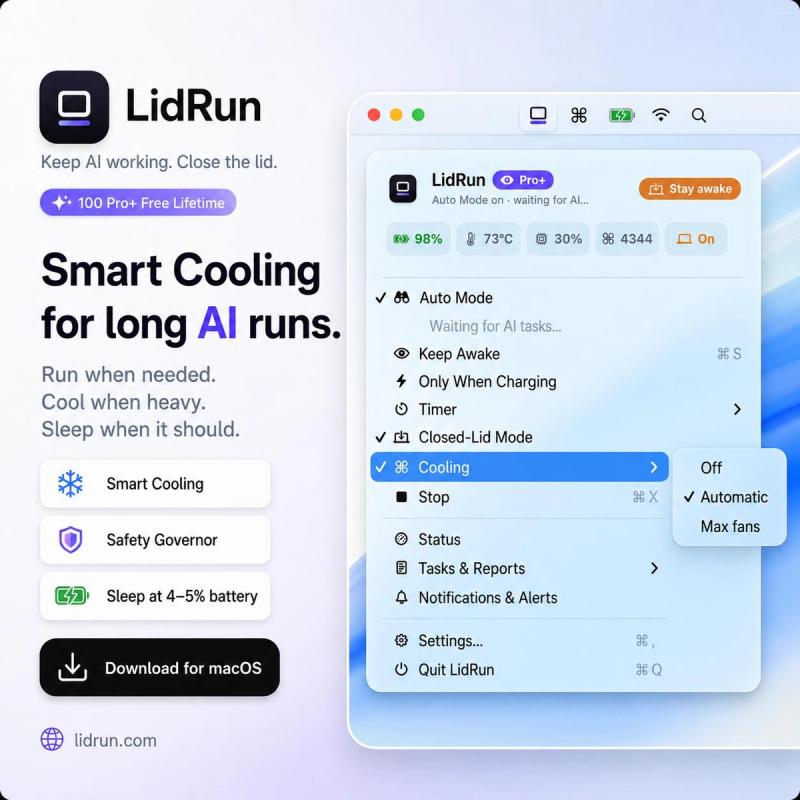
LidRun is a safety-aware Mac runtime that keeps AI coding agents and developer workloads running when you close the lid — then releases the Mac to sleep when the work is done or safety limits (timer, battery, thermal) are reached.
LidRun is a macOS utility for keeping a MacBook awake during AI-agent sessions, Docker builds, and other long-running dev tasks — including with the lid closed. It takes as input the active workload state plus your configured timer, charging, battery, and thermal settings, and outputs a controlled keep-awake session with a full activity log of why the Mac stayed awake and why it stopped. The app is made by LidRun, is notarized by Apple, opens on first click, and requires no account.
LidRun runs as a Mac menu-bar app. It watches for known workloads (Claude Code, Cursor, Codex, Docker, Ollama, Python, Node, Terminal, SSH, Xcode, uploads/downloads) and asserts a keep-awake power assertion while they're active. When all tracked work ends, or when a safety limit (timer expiry, low battery, thermal pressure) trips, it releases the assertion and lets the Mac sleep. Every decision is logged so you can see exactly why the Mac was awake and why it stopped.
LidRun has a free forever tier and a one-time paid Pro tier (no subscription). Free includes keep-awake for AI/dev jobs, timers, charging-only mode, low-battery auto-sleep, battery/thermal guardrails, dashboard, and weekly reports. Pro adds Closed-Lid mode, Auto Mode, custom command execution with auto-sleep on finish, watchdog rules, alerts, webhooks, and priority support — priced as a launch offer: one-time $9 per Mac (listed $19), with bundles for 2 Macs ($14) and 3 Macs ($19) and a 14-day money-back guarantee. A Startup plan covers 10 Macs for $59. See the pricing page for current details.
Yes — there's a free forever plan that covers keep-awake for AI and dev jobs, timers, charging-only mode, low-battery auto-sleep, battery and thermal guardrails, and a dashboard with weekly reports. No account or subscription is required.
Caffeinate keeps a Mac awake for a terminal session but is manual and unaware of workloads. LidRun detects when Claude Code, Cursor, Docker, or Ollama are active, auto-releases when they finish, and adds low-battery and thermal protection plus a full activity log.
At the battery level you set (around 4–5%), LidRun puts your Mac to sleep before it dies. When you plug in, you can pick up exactly where you left off — no lost work, no cold restart. Read more about auto-sleep on low battery.
No — traditional clamshell mode requires an external display. LidRun's Closed-Lid mode works with the lid closed and no external display attached, using its own power management.
Download the notarized app from lidrun.com, open it on first click, and no account is needed. The site also provides an install guide with setup details.