Inspo AI is an AI-powered workspace for searching curated UI screens, building moodboards, and scanning competitors in one web-based portal.
What is Inspo AI?
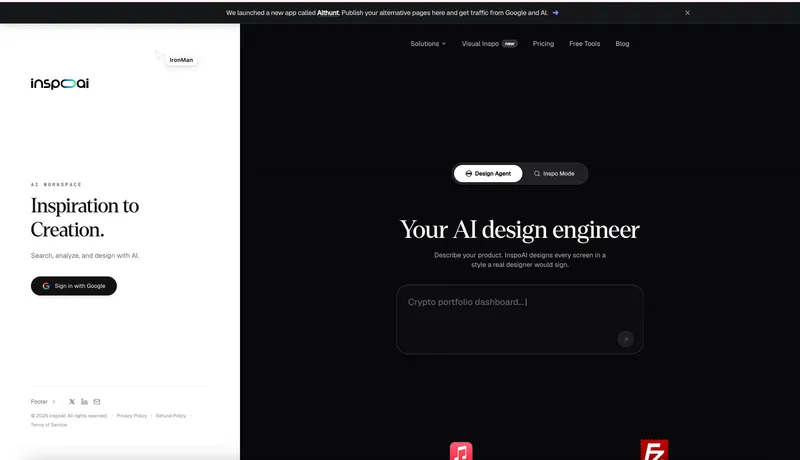
Inspo AI is an AI-powered design workspace that runs in the browser. It accepts a product description and produces design screen layouts, and it also provides access to a curated library of UI screens, moodboard building, and competitor scanning. The product is made by inspoAI and supports sign-in via Google.
Key Features
- Design Agent — Describe your product in the textarea; InspoAI generates every screen in a style a real designer would sign.
- Inspo Mode — Toggle from the main interface to search and browse UI inspiration.
- Curated UI screen search — Search across a curated collection of UI screens, as described in the meta description.
- Moodboard building — Create and manage moodboards within the workspace for design reference.
- Competitor scanning — Scan competitors' designs in the same portal to inform your own decisions.
- Visual Inspo — A newly added section for visual inspiration, marked "new" in the navigation.
- Google sign-in — Authenticate with a Google account to access the workspace.
- Free Tools — The navigation links to a /free-tools section with additional utilities.
Who is it for?
- Product designers — Search UI screens and build moodboards for design references and inspiration.
- Startup founders — Describe a product idea in the Design Agent to get initial screen designs without hiring a designer.
- Competitive analysts — Scan competitor UI designs to track industry patterns and inform decisions.
- Indie makers — Use the free tools and inspiration search to explore design directions quickly.
What can you do with Inspo AI?
- Designers: Search a curated library of UI screens to find visual references for their projects, then build moodboards for client presentations.
- Founders: Use the Design Agent to turn a product description into screen layouts, skipping the blank canvas phase.
- Teams: Create moodboards to align on design direction and share inspiration across the group.
- Competitive researchers: Scan competitor screenshots and design patterns to guide product strategy.
How does Inspo AI work?
The homepage shows two modes: Design Agent and Inspo Mode. In Design Agent, you type a product description into the textarea and press the generate button; the AI produces screen layouts in a professional design style. Inspo Mode provides a browsing interface for UI inspiration.
Pricing
Inspo AI appears to follow a freemium model. The navigation includes a Free Tools section, while a Pricing page and a Lifetime Plan Policy suggest paid plans, including a lifetime option. No specific dollar amounts are shown on the homepage.
FAQ
Is Inspo AI free?
The homepage links to a Free Tools section, but the core AI workspace appears to be paid, with a Pricing page and a Lifetime Plan Policy referencing paid plans. The exact free quota, if any, is not stated on the homepage.
What does Inspo AI do?
Inspo AI is an AI-powered workspace for searching curated UI screens, building moodboards, and scanning competitors. It also has a Design Agent that generates screen designs from a product description.
How do I sign in to Inspo AI?
The homepage prominently shows a "Sign in with Google" button, so you can authenticate using your Google account.
Does Inspo AI have a mobile app?
The product is described as a web portal; the homepage does not mention dedicated iOS or Android apps, so it is best accessed through a web browser.