
What imgsize.cc does
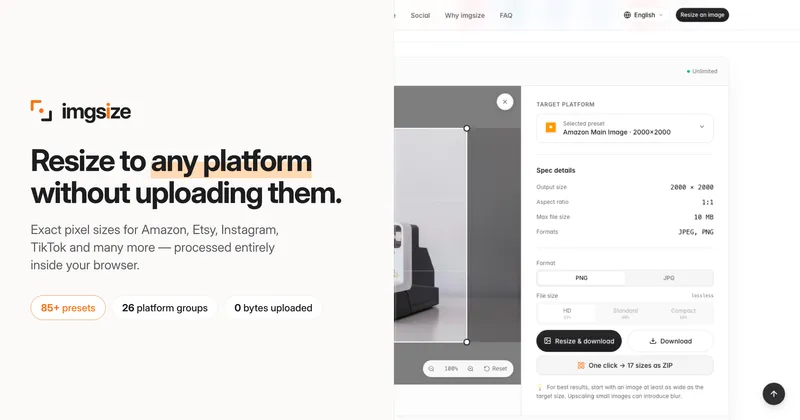
imgsize.cc is a free, browser-based image resizer and format toolkit built for people who need platform-correct images without installing desktop software or sending their files to a server. Drop a photo or screenshot into the workbench, choose the preset that matches the platform, adjust the crop if needed, and export the final file in the size, format and quality your channel expects. Everything runs locally in your browser, so the image never leaves your device.
Ready-made presets for every channel
The tool ships with 85+ curated size presets organized across 26+ categories, so you do not have to look up dimensions before every post. Presets cover major online marketplaces such as Amazon, Etsy, Shopify, Walmart and Flipkart; social networks including Instagram, TikTok, YouTube, LinkedIn, Facebook, X/Twitter, Pinterest, Snapchat and Threads; messaging and community platforms such as WhatsApp, Telegram, Discord and Twitch; and common creator surfaces such as newsletter banners, podcast art and Substack posts. Each preset records the recommended pixel dimensions, aspect ratio, accepted formats, file-size limit and a short usage note.
Editing and export options
Beyond resizing, imgsize.cc covers the common image tasks around a single upload:
- Format conversion — switch between WebP, JPG and PNG, keeping transparency where the output format supports it.
- File-size compression — reduce an image down to a specific KB or MB upload cap by adjusting dimensions, format and quality in that order, without pushing quality past the point where text and edges start to break up.
- Aspect-ratio cropping — crop to the exact ratio a slot requires while keeping the subject centered.
- Multi-spec ZIP — for one source image you can export a bundle of 17 platform-ready sizes in a single download.
How the workflow works
- Drop in your image — drag and drop, or select a file from your device.
- Pick a preset or custom size — choose a marketplace or social preset, or enter exact width and height manually.
- Export — choose the output format and quality, then download the result. You can also open the comparison view to check the before-and-after side by side.
Quality and privacy
Outputs are sized to the preset dimensions without upscaling past the source resolution, and transparency, sharp edges and flat backgrounds are preserved for graphics and logos. The service does not require an account, does not upload images to a server, and adds no watermark to exported files.
Who it is for
imgsize.cc is built for marketplace sellers preparing product and listing photos, social media managers scheduling channel posts, designers producing profile pictures and channel art, and anyone who regularly needs a photo resized, converted or compressed for a specific online slot.


