Huebert is a web-based UI color toolkit that turns seed colors into accessible color schemes and shadcn/ui themes — instantly, with contrast validation built in. Created by software engineer Flo, the tool runs entirely in the browser and outputs production-ready CSS or Tailwind variables for light and dark modes.
What is Huebert?
Huebert is a color scheme generator that transforms one or more seed colors into a complete UI color system mapped to semantic roles (background, foreground, primary, secondary, accent, surface, border, input). It also generates ready-to-use shadcn/ui themes. The web app works on any modern browser and is developed by Flo, a solo creator with over a decade of engineering experience.
Key Features
- Color Scheme Generator — Map palette colors to semantic UI tokens with live preview; validate contrast using WCAG and APCA; export CSS or copy tokens.
- shadcn/ui Theme Generator — Build full light and dark modes with one click; copy Tailwind CSS variables directly.
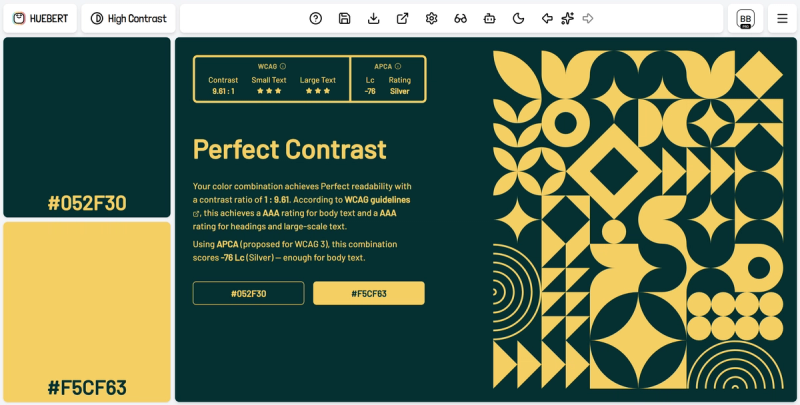
- High Contrast Generator — Create WCAG- and APCA-validated text/background pairs instantly.
- Palette Generator — Generate up to ten harmonious colors with optional AI assistance; fine-tune on an interactive color wheel.
- Image Color Picker — Extract up to ten colors from any uploaded photo; send them to other generators.
- Color Converter — Convert between HEX, RGB, OKLCH, and other spaces with live preview and shareable links.
- Personal Library — Save palettes, schemes, and themes in projects; reopen for editing or export (Pro feature).
- Background Generator — Apply random or existing palettes to create styled backgrounds for screenshots.
Who is it for?
- UI designers — rapidly explore accessible color pairs and export production tokens without manual contrast checks.
- Frontend developers — generate shadcn/ui themes and copy Tailwind variables to integrate directly into React/Next.js projects.
- Product teams — build and share consistent color systems across multiple projects using the library and export features.
What can you do with Huebert?
- Design a full UI color system from a single brand color — input a hex value, tune semantic tokens, and export CSS for light and dark modes.
- Create a shadcn/ui theme in seconds — choose a color, let Huebert generate both modes, and copy the Tailwind variables.
- Extract a palette from a photograph — upload an image, pick up to ten colors, then send them to the scheme or theme generator.
Pricing
Huebert operates on a freemium model. The Basic tier is free and includes the palette generator, background generator, image color picker, and color converter with no account needed. Huebert Pro costs €9.90 per month (excl. taxes) and unlocks the UI color scheme generator, shadcn/ui theme generator, AI-powered generation, personal library, API access, and all future features. Subscriptions can be canceled anytime.
FAQ
Is Huebert free?
Partly. The palette generator, background generator, and image color picker are free. Advanced generators (UI color scheme, shadcn/ui theme) and AI features require a Pro subscription.
Do I need an account?
No. Basic features work without an account. An account is required only for a Huebert Pro subscription.
What tokens does Huebert generate?
It generates background and foreground base colors, primary and secondary action colors with foregrounds, an accent color, surface and border tokens, and input colors — all mapped to semantic UI roles.
How does Huebert handle contrast?
It uses APCA-based contrast checks when pairing text and surfaces, preferring readable combinations by default over buttons, body copy, and components. It also includes a color blindness mode for preview.
Can I cancel anytime?
Yes. Pro subscriptions can be canceled at any time; access continues until the end of the current billing period.