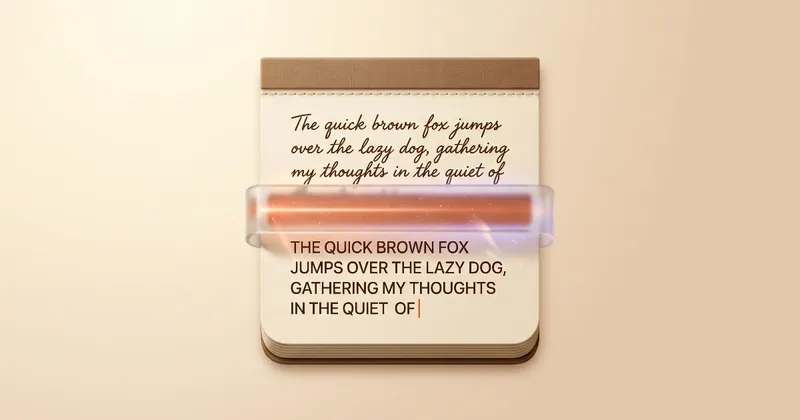
Handwriting to OCR is a browser-based handwriting recognition tool that converts photos, scans, and PDFs of handwritten pages into editable Markdown, DOCX, or PDF files, keeping tables, equations, and page structure intact.
What is Handwriting to OCR?
Handwriting to OCR is an online OCR service built specifically for handwriting rather than printed text. You upload a phone photo, an image, or a PDF of notes, journals, tables, scanned documents, or book pages, and the tool returns editable text with tables, headings, lists, quotes, math, and inline images preserved. It runs entirely in the browser on desktop or phone with nothing to install, and it recognizes handwriting in more than 170 languages, including pages that mix several languages. Each upload can be up to 50 MB, and up to 10 files can be processed at a time across 11 file types (PDF plus JPG, JPEG, PNG, AVIF, TIFF, GIF, HEIC, HEIF, BMP, and WEBP).
What makes Handwriting to OCR stand out?
- Built for real handwriting — reads hurried notes, joined-up cursive, shorthand, marginal comments, and handwriting written over printed text, not only clean print.
- Handwritten math — equations, fractions, exponents, and square roots are rendered as formatted math rather than flattened lines of text.
- Print layout preservation — Print layout reads where each text block sits on the original page and mirrors those positions; exporting as PDF in that mode keeps the placement.
- Structured output — titles, headings, bullet and numbered lists, quotes, headers, footers, and tables are recognized as separate blocks; Markdown keeps the hierarchy and DOCX carries headings across.
- Inline images extracted — logos, diagrams, sketches, and illustrations are pulled out as separate image files in Markdown and embedded directly in DOCX.
- Mixed-language pages — one page can switch between languages and each part is recognized in a single pass, covering English, French, German, Spanish, Portuguese, Italian, Polish, Russian, Arabic, Chinese, Japanese, Korean, Vietnamese, and Thai among others.
- Side-by-side review — the recognized result sits next to the original, and on desktop highlighted blocks show exactly which text and images were recognized.
- Fast turnaround — most files finish in 10 seconds to 1 minute, depending on file size and length.
Who should use Handwriting to OCR?
- Students: turn photographed lecture notes and whiteboard shots into editable Word or Markdown files, and pull quotes from books and papers without retyping.
- Journalists and media professionals: convert interview shorthand and press conference notes into draft copy, and make clippings and archives searchable.
- Lawyers and legal professionals: digitize handwritten contract annotations, court notes, and old case files, then extract clauses and compare revisions.
- Office and operations teams: convert whiteboard notes into structured documents and paper tables into tables that can be pasted into a spreadsheet; read handwritten work orders, timesheets, and receipts.
What can you do with Handwriting to OCR?
- Lecture notes to Markdown: a student photographs a page of handwritten notes, uploads it, and gets structured text in a Markdown file editable in any text editor or note app.
- Whiteboard to Word: a team photographs a whiteboard after a brainstorming session and exports as DOCX to revise and share in Word.
- Family archives: a scanned letter from a grandparent is exported as DOCX, keeping the text together with any illustrations so it can be printed or stored.
How does Handwriting to OCR work?
- Upload a photo, image, or PDF of notes, journals, tables, or a scanned document.
- The AI recognizes handwriting, tables, equations, images, and page layout — most files finish in 10 seconds to 1 minute.
- Review the text against the original side by side, then export as Markdown, DOCX, or PDF.
Pricing
Handwriting to OCR uses pay-as-you-go credits with no subscription, where 1 credit equals 1 page of OCR. New accounts get 5 free credits with no credit card required. Credit packs are listed at 100 credits for $9.90, 1,200 credits for $19.90, and 8,000 credits for $99.00, and orders can be refunded in full within 14 days if the remaining balance is not lower than the credits purchased.
FAQ
Is Handwriting to OCR free?
New users receive 5 free credits, enough to process 5 pages such as 5 images or a 5-page PDF, with no credit card required. Beyond that it is pay-as-you-go: there is no monthly subscription, and you buy credit packs only when you need more pages.
Which file formats and limits does it support?
It accepts PDF plus 10 image formats including JPG, JPEG, PNG, AVIF, TIFF, GIF, HEIC, HEIF, BMP, and WEBP. Each file can be up to 50 MB, and up to 10 files can be uploaded at one time.
Does it keep tables, equations, and page layout?
Yes. Handwritten equations, fractions, exponents, and square roots are rendered as formatted math, and tables are recognized row by row and column by column. Headings, lists, quotes, headers, and footers are kept, and PDF export in Print layout preserves the original page placement.
How do I export my results?
Choose Markdown, DOCX, or PDF. Markdown saves images as separate image files, DOCX embeds them in the document, and PDF follows the current layout mode. PDF export opens your browser's print dialog, where you choose Save as PDF to finish.


