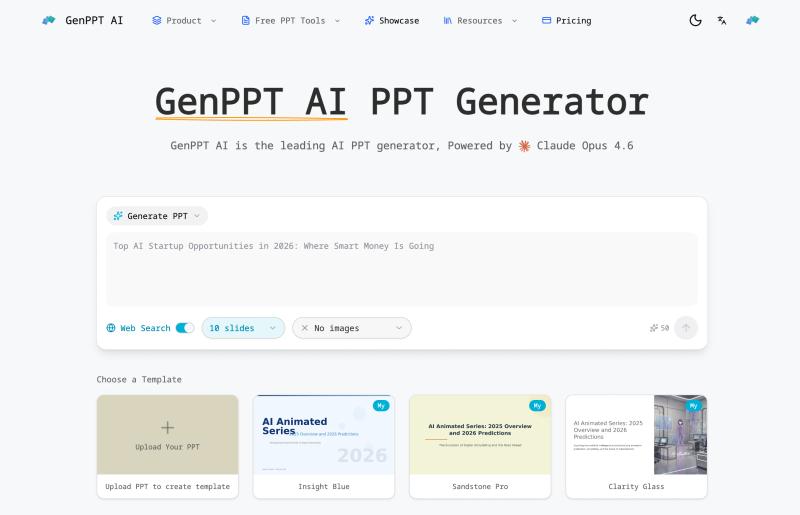
GenPPT AI is an AI presentation generator that creates, beautifies, and converts slide decks using Claude Opus 4.7 and other large language models.
What is GenPPT AI?
GenPPT AI is a web-based AI presentation tool that takes a text description, existing document (PDF, Word, HTML), or uploaded slides and produces a polished PowerPoint presentation with professional layouts and styling. It runs entirely in the browser with real-time preview and editing, then exports to standard PPTX format. The platform is built by GenPPT AI and is featured in publications like Superhuman AI, AiNews.com, and Daily AI Wire.
Key Features
- AI Generate PPT — Describe your topic in plain text and receive a complete, professionally designed slide deck with proper structure, layouts, and content. Try it here.
- AI Beautify PPT — Upload existing presentations to have AI redesign slides, fix layouts, and apply consistent styling. Learn more.
- AI PDF to PPT — Convert PDF files into editable PowerPoint presentations while preserving content structure. Use the tool.
- AI Speech Notes from PPT — Automatically generate speaker notes and talking points for each slide. See how.
- PPT to PDF — Convert PowerPoint files to PDF format instantly. Convert here.
- PPT Reverse Prompt — Extract the original text prompt from any AI-generated presentation. Try it.
- Generate Speech from PPT — Turn slides into audio narration using text-to-speech. Use the tool.
- YouTube to PPT — Create presentations from YouTube videos by extracting key points. Try it.
- Template library — Pre-built styles like "Ink Classic" (magazine-inspired typography, asymmetric spacing) with style presets such as
magazine-ink.
Who is it for?
- Business professionals — Create sales decks, pitch presentations, and internal reports from notes or existing documents in minutes.
- Educators — Convert lecture notes or PDF handouts into structured slide presentations with speaker notes.
- Content creators — Transform YouTube videos, blog posts, or plain text into visual slide decks for online courses or webinars.
- Non-designers — Beautify poorly formatted slides into professional-looking decks without graphic design skills.
What can you do with GenPPT AI?
- Sales teams: Create a compelling sales deck from a product description using the AI Generate PPT feature, then add speaker notes for consistent delivery.
- Teachers: Upload a PDF syllabus and convert it into a multi-slide presentation with AI PDF to PPT, then generate speech narration for flipped classrooms.
- Marketers: Repurpose a YouTube video into a slide deck for LinkedIn or blog posts using YouTube to PPT, then beautify the result with a consistent brand template.
- Event speakers: Start from bullet-point notes, generate slides with AI, then use Generate Speech from PPT to rehearse timing.
How does GenPPT AI work?
- Choose a tool (e.g., AI Generate PPT) and enter your topic as text, or upload a file for conversion or beautification.
- The AI (powered by Claude Opus 4.7 by default, with option to use Haiku 4.5) selects slide layouts, inserts relevant imagery, and formats content.
- Preview the result in the browser and make real-time edits to text, images, or layouts.
- Export the final deck to PPTX format compatible with Microsoft PowerPoint, Google Slides, and Keynote.
Pricing
GenPPT AI operates on a freemium model. A free tier is available (e.g., up to 5 slides per generation). Paid plans unlock additional slide counts, premium templates, and advanced features. Full pricing details are on the pricing page.
FAQ
Is GenPPT AI free?
GenPPT AI offers a free tier that lets you generate presentations with basic features (e.g., 5 slides per generation). Upgrading to a paid plan provides more slides per deck, access to premium templates, and higher usage limits.
What can I use GenPPT AI for?
You can generate new presentations from text, beautify existing ones, convert PDFs or YouTube videos into slides, generate speaker notes, extract prompts from existing slides, and convert slides to PDF or audio.
Does GenPPT AI support multiple languages?
Yes, GenPPT AI supports multiple languages including English, Chinese, Korean, and others, with proper typography and formatting for each.
Can I edit presentations after they are generated?
Yes. GenPPT AI provides a real-time browser-based editor where you can modify text, swap images, change layouts, and apply different styles before exporting.
What export formats are supported?
You can export presentations as PPTX files compatible with Microsoft PowerPoint, Google Slides, and Apple Keynote. PDF conversion is also available via the PPT to PDF tool.
Explore More
- Browse user-created presentations in the Showcase
- View all available tools including AI Generate PPT, AI Beautify PPT, AI PDF to PPT, AI Speech Notes from PPT, PPT to PDF, PPT Reverse Prompt, and Generate Speech from PPT.