Gemini Omni is a third-party resource library and prompt marketplace for Google's Gemini Omni AI video model, helping creators generate better AI videos with 100+ structured prompt templates, real demo examples, and a workflow focused on precise camera movement, subject, action, environment, and style instructions.
What is Gemini Omni?
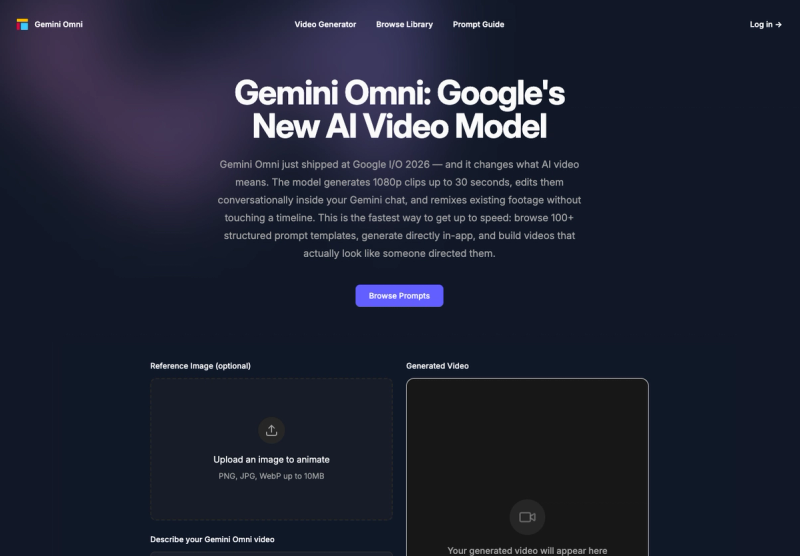
Gemini Omni is a curated prompt library and community hub for users of Google's Gemini Omni AI video model, which generates 1080p clips up to 30 seconds, edits them conversationally inside Gemini chat, and remixes existing footage without a timeline. This site provides over 100 ready-to-copy prompt templates, demo videos generated from those templates, and a video generator tool that accepts text prompts and optional reference images (PNG, JPG, WebP up to 10MB) to produce clips directly in the browser.
Key Features
- Structured Prompt Templates — 100+ categorized prompts (cinematic, ads, nature, anime, asmr, comedy) each specifying camera move, subject, action, environment, and style for consistent outputs.
- Real Demo Videos — Embedded example clips generated from the templates, showing exact output quality (e.g., "Lone Hiker Revealed at the Edge of a Colossal Canyon," "180-Degree Arc Shot Around a Singer on Stage").
- In-App Video Generator — A built-in generator where users can paste a prompt, optionally upload a reference image, set duration (4 seconds default), and generate a video directly on the site.
- Copy-to-Clipboard Prompt Access — Every template includes a "Copy Prompt" button and a "Try It Yourself" link to the generator, minimizing friction.
- Category Browsing — Templates filterable by tag: all, ads, anime, asmr, cinematic, comedy, nature.
- Third-Party Badge Ecosystem — The site displays badges from multiple directories (Twelve Tools, Fazier, Startup Fame, etc.) indicating it is a community resource, not an official Google product.
Who is it for?
- AI video beginners — Users who want to avoid blank-box paralysis and get proven prompts that consistently produce good results.
- Content creators and social media marketers — Creators needing quick, on-brand clips without deep video editing skills.
- Filmmakers and advertisers — Professionals who need to rapidly prototype scenes or generate B-roll with specific cinematic techniques (crane shots, macro, 180-degree arcs).
What can you do with Gemini Omni?
- Generate a custom video from a template — Browse by category, copy a template like "Arctic Fox Chase Drone Shot," paste it into the generator, optionally add a reference image, and produce a 4–30 second clip.
- Learn prompt engineering for AI video — Study the structure of successful prompts (JSON or natural language with key parameters) to write your own.
- Remix existing footage — Upload a video clip and describe a transformation (e.g., change style to cinematic, extend duration) — Gemini Omni applies it without timeline editing.
- Iterate via in-chat editing — After generation, type changes like "swap the background to a rainy street" and the model updates only the specified layer, preserving the rest of the clip.
How does Gemini Omni work?
Users select a template from the library or write their own prompt, optionally upload a reference image, then click "Generate Video." The site sends the prompt to the Gemini Omni API (via the user's own Gemini chat session or the site's embedded generator). The model processes the structured instructions — including camera motion, subject description, action sequence, environment details, and style — and outputs a 1080p video clip up to 30 seconds. After generation, users can edit the video conversationally or remix it with new instructions.
FAQ
Is Gemini Omni free to use?
The site provides free access to the prompt library and demos. Actual video generation consumes Gemini Omni API credits, which may have free daily limits depending on the user's Google account tier. The site itself does not charge for template access.
Is this site affiliated with Google?
No. This is a third-party resource built by the community. The site clearly states it is not affiliated with Google or Gemini.
What makes a good Gemini Omni prompt?
Effective prompts specify five elements: camera move (e.g., crane shot, macro), subject (e.g., lone hiker, tennis ball), action (e.g., running, cracking open), environment (e.g., misty canyon, black background), and style (e.g., cinematic, editorial realism). The templates on this site demonstrate this structure.
Can I use my own reference images?
Yes. The site accepts PNG, JPG, or WebP images under 10 MB to animate as part of the video.