
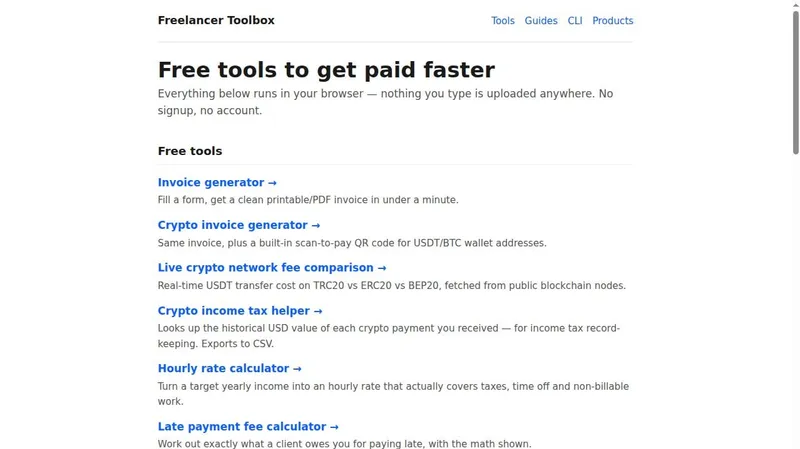
Freelancer Toolbox is a browser-based collection of free invoicing, rate, tax, and contract tools for freelancers, plus paid document templates and open-source command-line utilities, published at kleogeos.github.io/freelancer-tools.
What is Freelancer Toolbox?
Freelancer Toolbox is a set of free web tools that run entirely in the browser with no signup or account. It takes form inputs—client details, amounts, wallet addresses, or pasted contract text—and outputs printable/PDF invoices, crypto payment QR codes, CSV tax records, hourly rates, late fee calculations, and clause checklists. The site also sells paid templates (Freelancer Starter Kit, 40 AI Prompts for Freelancers, Web Developer Pack, and a bundle) and provides open-source CLI tools installable via pip. It is made by kleogeos on GitHub.
Key Features
- Invoice generator — fill a form and get a clean printable/PDF invoice in under a minute.
- Crypto invoice generator — same invoice plus a built-in scan-to-pay QR code for USDT/BTC wallet addresses.
- Live crypto network fee comparison — real-time USDT transfer cost on TRC20 vs ERC20 vs BEP20, fetched from public blockchain nodes.
- Crypto income tax helper — looks up the historical USD value of each crypto payment received for income tax record-keeping and exports to CSV.
- Hourly rate calculator — turns a target yearly income into an hourly rate that covers taxes, time off, and non-billable work.
- Late payment fee calculator — works out exactly what a client owes for paying late, with the math shown.
- Self-employment tax estimator (US) — rough estimate of what to set aside for taxes before spending an invoice payment.
- Contract checklist scanner — paste a contract and instantly see which of 10 standard freelance-protection clauses are missing.
- Open-source CLI tools — pip-installable commands for invoice generation, contract checking (including a pre-commit hook), rate calculation, and checking USDT TRC20 payments without an API key.
Who is it for?
- Freelancers and independent contractors — create invoices, calculate rates, and track crypto payments without signing up for accounting software.
- Crypto-paid freelancers — generate invoices with QR codes, compare network fees, and record historical USD values for tax purposes.
- US-based self-employed workers — estimate self-employment tax and set aside money from invoice payments.
- Developers and technical freelancers — use the open-source CLI tools to script invoicing, rate scenarios, or contract checks into existing workflows.
What can you do with Freelancer Toolbox?
- Freelance designers and writers: create a printable PDF invoice in under a minute by filling a form, then email it to a client without creating an account.
- Crypto-paid contractors: generate an invoice with a scan-to-pay QR code for USDT or BTC, and check the current TRC20 vs ERC20 vs BEP20 transfer fee before asking for payment.
- Self-employed workers in the US: estimate self-employment tax on an incoming payment and calculate a late fee if a client pays after the due date.
- Developers: install the freelance-invoice-cli via pip to generate HTML invoices from a JSON file, or wire contract-checklist-cli into a pre-commit hook to catch missing contract clauses before signing.
How does Freelancer Toolbox work?
All free tools run entirely in the browser; nothing typed is uploaded. The invoice generator takes form inputs and produces a printable/PDF invoice. The contract scanner accepts pasted contract text and returns a list of missing clauses. The CLI tools are installed via pip and accept flags or JSON files, returning JSON or HTML output.
Pricing
Freemium: the web tools and guides are free, while paid templates are one-time purchases: Freelancer Starter Kit $15, 40 AI Prompts for Freelancers $9, Web Developer Pack $12, or all three bundled for $25 (versus $36 separately). Payment is via crypto and no account is needed.
FAQ
Is Freelancer Toolbox free?
Yes, all nine browser-based tools—including the invoice generator, rate calculator, and contract checklist scanner—are free and require no signup. Paid templates like the Freelancer Starter Kit ($15) are optional.
What can I do with the crypto invoice generator?
It creates the same printable/PDF invoice as the standard generator and adds a scan-to-pay QR code for USDT or BTC wallet addresses. You can also compare live USDT transfer fees across TRC20, ERC20, and BEP20 networks.
Does Freelancer Toolbox store my data?
No. Every free tool runs entirely in your browser, and the page states that nothing you type is uploaded anywhere. There is no signup or account required.
Are there command-line versions?
Yes. Four open-source CLI tools are available on GitHub: freelance-invoice-cli, contract-checklist-cli, freelance-rate-cli, and crypto-pay-cli. They are installable via pip; crypto-pay-cli checks USDT (TRC20) payments and generates receive QR codes without an API key.
What paid templates are available?
Three document packs are sold for one-time crypto payment: Freelancer Starter Kit ($15, 7 documents), 40 AI Prompts for Freelancers ($9), and Web Developer Pack ($12). A bundle of all three costs $25 instead of $36.


