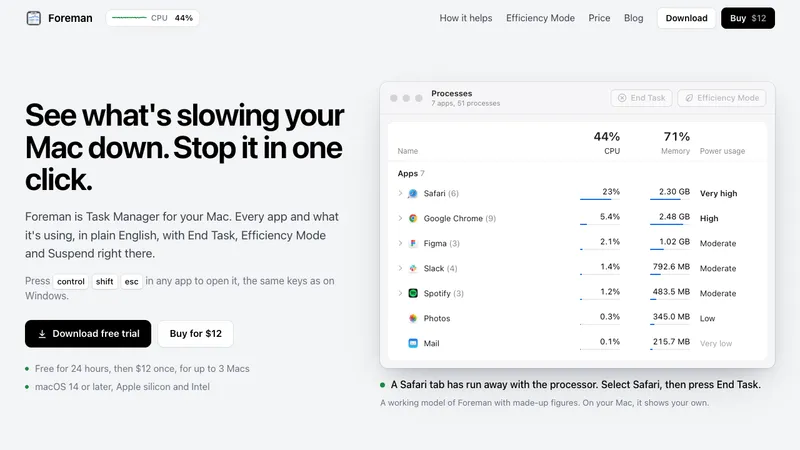
Foreman is a Windows-style Task Manager for the Mac. Press Control Shift Escape in any app to open it and see every app and what it's using, in plain English, with End Task, Efficiency Mode and Suspend right there.
Most slowdowns have one cause you can see and deal with. When a browser tab runs away with the processor, sort by CPU, open the app, and end the one process doing nearly all of it.
Six pages in the sidebar, the way Windows has them:
- Processes: apps, background and system processes, each app with its helpers added up under it.
- Performance: live graphs for CPU (overall or core by core), memory with memory pressure, disk, Wi-Fi and GPU.
- App History: processor time, disk, network and energy, since each app opened.
- Startup Apps: what opens at login or runs in the background, grouped by app, including the leftovers of deleted apps.
- Details: every process with its PID, user, priority and path, with Set Priority, End Process Tree and Properties.
- Services: the background services of macOS, with Start, Stop and Restart.
Names you can actually read. macOS runs hundreds of programs with names like mds_stores. Foreman says what each one is, keeps the real name beside it, and folds every helper under the app it works for.
Efficiency Mode is for the app you need open but don't need right now. In the background it gets a quarter of the processor it would take, at low priority, on the efficiency cores of Apple silicon, and it runs at full speed again when you switch to it.
A live readout sits in the menu bar. Click it for a panel with your Mac's figures and the apps using the most, each with End Task.
End Task asks an app to quit the normal way, so it can offer to save your work. Force quitting warns you first.
Free for 24 hours, then $12 once for up to 3 Macs. macOS 14 or later, Apple silicon and Intel. Signed and notarized by Apple.