FeatureImg is a browser-based featured image maker that turns a page URL or template into polished, editable images for blogs, social posts, and Open Graph previews.
What is FeatureImg?
FeatureImg is an online tool for creating visual assets without design skills. It takes input from a URL (to extract page title and metadata) or from pre-built templates, and produces downloadable images in PNG, JPEG, or WebP formats. The tool runs entirely in the browser with no account required. It is developed and maintained by the FeatureImg team.
Key Features
- URL scanning — Paste any webpage URL to automatically pull its title and metadata into an editable image template.
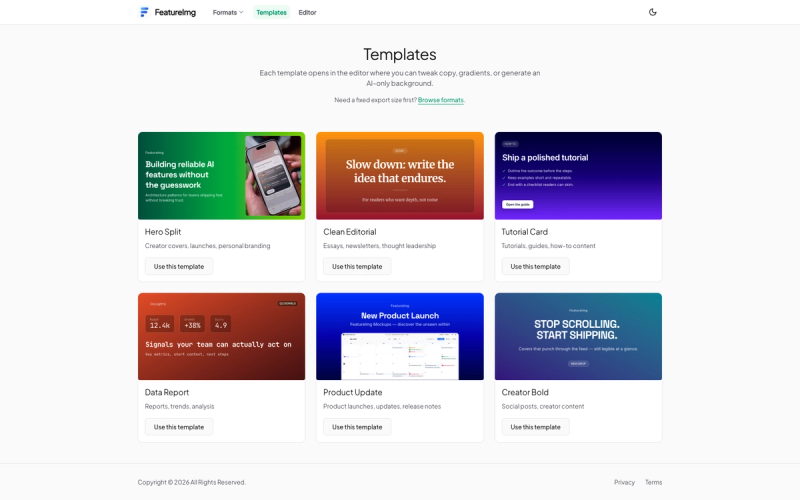
- Pre-built templates — Choose from 9+ ready-made layouts (e.g., Hero Split, Clean Editorial, Quote) optimized for different content types.
- Format-aware sizing — Each template matches the dimensions of common output formats (blog featured images, OG images, YouTube thumbnails, etc.) so exports fit their intended use.
- Browser-based editor — Edit headline, subtitle, badge text, and background styling directly in the browser with instant preview.
- Multi-format export — Download images as PNG, JPEG, or WebP at the template's native resolution.
- No account or sign-up — Use all features without creating an account or logging in.
Who is it for?
- Bloggers and content creators — Quickly produce featured images for new articles by scanning the article URL or selecting a template.
- Social media managers — Generate Open Graph images, LinkedIn posts, X posts, and Instagram Reels covers with consistent branding.
- Marketers and product teams — Create launch images, product update cards, and report covers without waiting on a designer.
- Podcasters and YouTubers — Design podcast cover art and YouTube thumbnails at the correct dimensions.
What can you do with FeatureImg?
- Blog featured images — Turn any blog post title into a full-width cover image using templates like Hero Split or Clean Editorial.
- Open Graph images — Generate shareable preview images for social links with the correct 1200×630 resolution.
- YouTube thumbnails — Create thumbnails with bold text and split images using the Creator Bold or Full Image Split templates.
- Social media posts — Build LinkedIn posts, X posts, and Instagram Reels covers directly from the editor.
- Podcast covers — Export 3000×3000 podcast artwork using the Profile or Quote templates.
- Xiaohongshu covers — Produce vertical covers for the Chinese social platform.
How does FeatureImg work?
- Start from a URL or a template — Paste any webpage URL to auto-populate the title and metadata, or browse the template gallery and pick a starting layout.
- Customize your content — Edit the headline, subtitle, badge text, and background styling. All changes render instantly in the preview.
- Export your image — Choose between PNG, JPEG, or WebP format and download the image at the template's original size.
This workflow eliminates the blank canvas and manual resizing, making image creation fast and repeatable.