DoMarkdown is a free online Markdown workspace that lets you write, preview, and convert Markdown to PDF, Word, plain text, and HTML in real time.
What is DoMarkdown?
DoMarkdown is a web-based Markdown editor and converter that accepts Markdown input (typed, pasted, or imported as a file) and produces formatted previews plus downloadable output in PDF, DOCX, plain text, or standalone HTML. It runs entirely in the browser and is developed by the DoMarkdown team.
Key Features
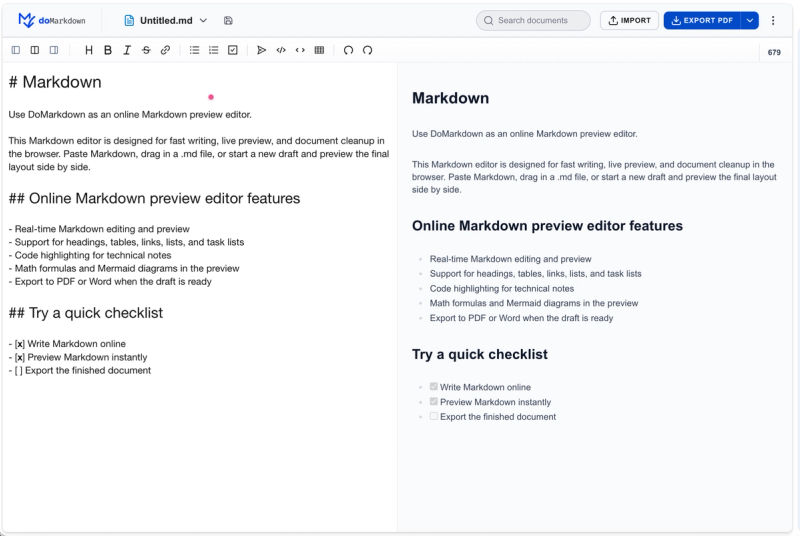
- Live Online Preview — Side-by-side rendering updates as you type, showing headings, lists, tables, code blocks, math, and Mermaid diagrams instantly.
- Markdown to PDF — Export a polished PDF for sharing or archiving; uses the live preview layout.
- Markdown to Word — Generate an editable DOCX file compatible with Microsoft Word, WPS, and Google Docs.
- Markdown to Text — Strip all Markdown syntax to produce clean plain text for reuse in other apps.
- Markdown to HTML — Convert Markdown into structured HTML for websites, documentation, or publishing.
- Code, Tables, Math, Mermaid Support — Common Markdown extensions including fenced code blocks, tables, task lists, LaTeX math, and Mermaid diagrams are rendered in the preview.
- Three-Step Workflow — Copy or write Markdown, preview the layout, then export to your chosen format.
Who is it for?
- Writers and bloggers who want to preview their Markdown formatting and export finished posts as HTML or PDF.
- Developers and technical writers who need to convert documentation from Markdown to Word or PDF for distribution, while keeping the source in their preferred format.
- Students and researchers who want to take notes in Markdown and later convert to plain text or PDF for submission.
What can you do with DoMarkdown?
- Export polished PDFs — Perfect for sharing final drafts, reports, or archives directly from Markdown.
- Create editable Word documents — Useful when collaborators require .docx files for review in Microsoft Word or Google Docs.
- Strip Markdown to plain text — Quickly remove formatting to reuse content in systems that don’t support Markdown.
- Generate HTML for websites — Convert Markdown to clean HTML for static site generators or documentation pages.
How does DoMarkdown work?
- Copy or write Markdown — Paste existing Markdown, import a local file, or type directly in the online editor.
- Preview the final layout — See headings, lists, tables, code blocks, math, and Mermaid diagrams update in real time.
- Export PDF or Word — Choose your output format; the conversion happens in the browser with no server upload for standard use.
FAQ
Is DoMarkdown free?
Yes, the online editor and all conversions (PDF, DOCX, Text, HTML) are available at no cost.
What output formats are supported?
Currently supported: PDF, Microsoft Word (DOCX), plain text, and standalone HTML.
Does it support code blocks and tables?
Yes, the preview renders fenced code blocks (with syntax highlighting), tables, task lists, and other common Markdown extensions.
Can I preview math and Mermaid diagrams?
Yes, LaTeX math and Mermaid diagram syntax are rendered in the live preview.
Will my content be uploaded to a server?
Editing and preview happen in the browser. Unless you use future cloud features, documents are not stored long-term on servers.