Newsletter
Join the Community
Subscribe to our newsletter for the latest news and updates
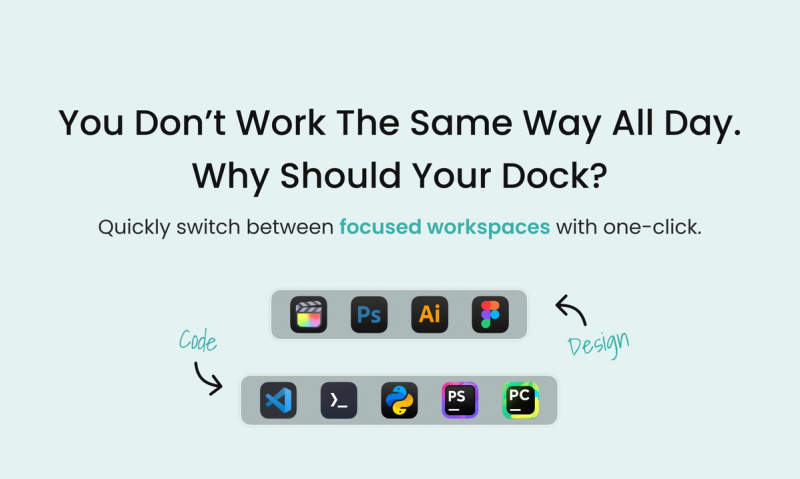
DockFlow lets you save dock presets on your Mac and switch between them instantly. Launching the apps you need, closing the ones you don't.
Traffic, search & AI signals for dockflow.appitstudio.com.
Third-party traffic estimate · Updated Sep 9, 2026
Submit your own product to reach creators and founders looking for the next tool to try.
DockFlow is a macOS productivity app that lets you save multiple Dock presets and switch between them instantly — launching the apps you need and closing the ones you don't. It runs on macOS 13.5 or later, needs no special permissions, and is developed by Appit Studio.
DockFlow lets you capture your current Dock layout as a preset — including apps, folders, files, web links, and spacers — then switch to any preset with one click or a keyboard shortcut. It works with the native macOS Dock, so there's zero performance impact and full compatibility with every macOS update. Presets can also trigger app actions (e.g., open an IDE with a specific project) and integrate with Apple Shortcuts and Focus modes.
Cmd+Shift+1 to load your 'Design' preset with Figma, Illustrator, and a browser profile.DockFlow offers a 1-Year plan (€9.99/device), a Lifetime plan (€29.99 per Mac with 15% off), and a Small Team plan (€69.99 for 5 devices with 30% off). All plans include unlimited presets, all features, and a 30-day money-back guarantee. A bundle with ExtraBar and ExtraDock is also available.
Click "Add Preset," capture your current Dock with "Set from Current Dock," or build one by adding apps. You can also include folders, files, web links, and spacers. Name it and you're done.
Yes. DockFlow supports single key shortcuts, key sequences, and multi-press hotkeys. You can also automate switching with Apple Shortcuts or link presets to macOS Focus modes.
DockFlow works with your native macOS Dock instead of replacing it — no special permissions required, full compatibility with macOS updates, and zero performance impact. It's workflow-based, not just cosmetic.
Yes. DockFlow includes Lock Dock, which anchors your Dock to a chosen display so it stops jumping between screens.
Plans start at €9.99/year. See the pricing section above for current tiers. Every plan includes a 30-day money-back guarantee.