
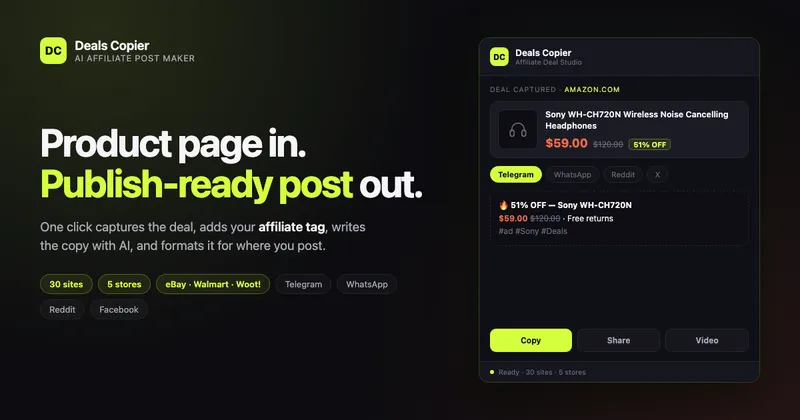
Deals Copier is a Chrome extension that converts a live product page on Amazon, eBay, Walmart, Woot! or Flipkart into a publish-ready affiliate post — affiliate link tagged, AI copy written, and formatted for Telegram, WhatsApp, Reddit, X or Facebook in one click.
What is Deals Copier?
Deals Copier is a browser extension that takes a product page URL as input and outputs a formatted affiliate post. It reads the page in the popup and returns the deal title, deal price, MRP, discount percentage, bank offers, images, a tagged affiliate link, and copy written or translated by AI. Capture runs locally in the browser and output can be copied as text, an image collage, or a square video. The page does not name the maker.
Key Features
- 30 storefronts across 5 stores — Amazon (22 marketplaces, including amazon.com, amazon.co.uk, amazon.de, amazon.in, amazon.co.jp, amazon.com.au, amazon.ae, amazon.sa, amazon.eg, amazon.com.tr and amazon.co.za), eBay (5 sites), Walmart, Woot! and Flipkart.
- Precision one-click capture — Extract pulls the title, deal price, MRP, discount %, bank offers and product images from real product URLs only, so the popup does not produce half-empty deal cards.
- Per-store affiliate setup — choose your network (Amazon Associates, eBay Partner Network, Rakuten, CJ or EarnKaro), fill in one or two IDs, and preview the actual tagged affiliate link before saving.
- AI writing and translation — shortens long product titles, writes the deal pitch, and translates the finished post into 12 languages.
- Five platform formats — a single deal is re-laid out for Telegram, WhatsApp, Reddit, X and Facebook, each with its own text structure.
- Image and video export — generates a 3-image collage as PNG, or a square carousel video with zoom and fade transitions.
- Local-only capture — deal data is read from the page and written straight into the popup; it never passes through the vendor's servers.
- Disclosure built in — an optional #ad tag and a "(may vary)" price disclaimer are appended to every export, and Light/Dark themes follow the system or can be locked under Settings → Appearance.
Who should use Deals Copier?
- Telegram and WhatsApp deal-channel admins: capture a price drop and get channel-ready text plus a 3-image collage without retyping the price, MRP and discount.
- Reddit deal posters: pull the deal data from a product page and reformat it for subreddit-style posts while keeping the affiliate tag attached.
- Affiliates on X and Facebook: turn several deals a day into short posts with AI-shortened titles and translated copy for non-English audiences.
- Multi-marketplace affiliates: run separate affiliate IDs for Amazon Associates, eBay Partner Network, Rakuten, CJ or EarnKaro and preview each tagged link before posting.
What can you do with Deals Copier?
- Run a regional deal channel: capture from any of the 22 Amazon marketplaces and publish in one of 12 languages, so the same deal can go out in a local-language Telegram post.
- Batch-post across networks: tag a Walmart or Flipkart link with EarnKaro or CJ and push the same deal to five platforms in five formats.
- Add visual assets to a post: export a square carousel video with zoom and fades for feeds that favour video over a text link.
- Stay compliant: leave the #ad tag and "(may vary)" price disclaimer enabled so exported posts carry the disclosure automatically.
How does Deals Copier work?
- Open a product page on any of the 30 supported sites.
- Click Extract in the extension popup to fill the deal card.
- Toggle the extras you want — AI title, deal pitch, translation, affiliate link, target platform format.
- Copy the formatted text to your clipboard, or download the image collage or square video.
Pricing
Deals Copier is free to install from the Chrome Web Store and uses a freemium model: the free tier includes 10 AI calls per month, and Pro unlocks unlimited AI writing and translation.
FAQ
Is Deals Copier free?
Installing the extension is free and the free tier includes 10 AI calls per month. Unlimited AI writing and translation require the Pro tier. Capture, affiliate tagging and platform formatting are part of the extension itself.
Which stores and sites does it support?
It supports 30 sites across 5 stores: 22 Amazon marketplaces, 5 eBay sites (ebay.com, ebay.co.uk, ebay.de, ebay.com.au, ebay.ca), walmart.com, woot.com and flipkart.com. Capture only runs on real product URLs.
Does my deal data get sent to a server?
No. Deal data is read from the page and written straight into the popup, so capture stays in the browser. AI writing and translation are the parts that depend on the AI call quota.
Does it add an affiliate disclosure?
Yes, optionally. An #ad tag and a "(may vary)" price disclaimer can be appended to every export, so published posts carry the disclosure without manual editing.
Which platforms can it format posts for?
One deal can be exported in five formats: Telegram, WhatsApp, Reddit, X and Facebook, plus a PNG 3-image collage or a square carousel video.


