DaFont is a free font archive website offering over 100,800 downloadable fonts from independent designers, organized by style, alphabet, and popularity.
What is DaFont?
DaFont is a web-based archive that hosts over 100,800 font files contributed by individual designers worldwide. It indexes fonts by category (e.g., Fancy, Script, Gothic) and alphabet, allowing users to preview and download fonts directly. The platform is free to use and does not require registration for downloads, though some fonts are limited to personal use only.
Key Features
- Extensive Library — Over 100,800 fonts across categories like Cartoon, Calligraphy, Handwritten, Techno, and Dingbats, updated daily with new additions.
- Alphabetical Browsing — Browse fonts by first letter (A–Z and #) for quick lookup.
- Theme Categories — 8 main theme groups (Fancy, Foreign look, Techno, Gothic, Basic, Script, Dingbats, Holiday) each with subcategories like Comic, LCD, Medieval, etc.
- Installation Guide — Clear, OS-specific instructions for Windows 10/8/7/Vista and Mac OS X.
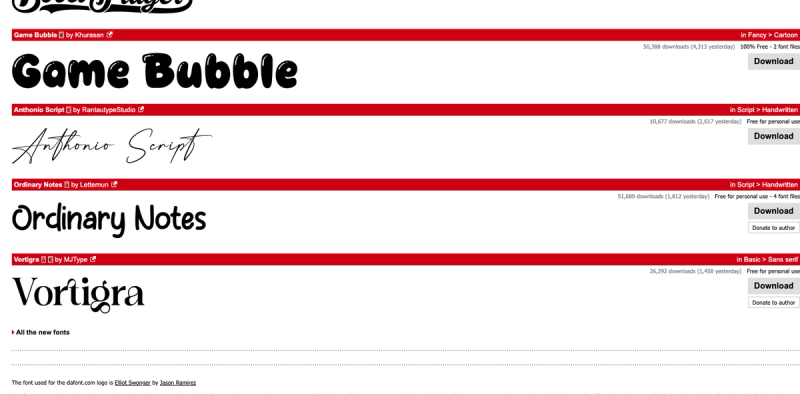
- Download Counts and Trends — Each font shows total downloads and yesterday's downloads, helping gauge popularity (e.g., Singsong had 64,350 total downloads with 6,217 yesterday).
- Licensing Information — Each font indicates whether it's free for personal use, shareware, or demo; author details and official website links are provided.
- Regular Updates — A dedicated "New fonts" page lists recently added fonts with download counts.
- Simple Download — Direct download links to font files (typically TTF or OTF) with file sizes shown.
Who is it for?
- Graphic designers seeking a wide variety of typefaces for commercial or personal projects, but must verify individual font licenses.
- Hobbyists and DIY enthusiasts looking for decorative fonts for invitations, posters, or crafts.
- Web developers needing unique fonts for website headers or branding elements (with appropriate licensing).
What can you do with DaFont?
- Find a font for a specific project — Use category browsing (e.g., "Script > Calligraphy" for elegant wedding invitations) or search by name.
- Download and install fonts quickly — Follow the OS-specific instructions to add fonts to your system within minutes.
- Stay updated with new releases — Check the "Recently added fonts" section or sort by date to discover fresh designs.
Pros and cons
- Pros: Large, diverse collection; free to browse and download; no account required; clear installation help; active community with trending fonts.
- Cons: License terms vary per font and may require personal-use restriction; no built-in font preview tool (must scroll through examples); some fonts may lack detailed licensing info.
Pricing
DaFont itself is free to use. Fonts are offered by their authors under various licenses: freeware, shareware, demo, or public domain. Some authors accept donations.
FAQ
Is DaFont free?
Yes, browsing and downloading fonts from DaFont is completely free. However, individual fonts may have licensing restrictions (e.g., free only for personal use). Always check the readme file or author's site.
How do I install a font from DaFont?
After downloading the font file (usually .zip), extract it. On Windows 10/8/7/Vista, right-click the font file and select "Install". On Mac OS X, double-click the font file and click "Install font".
Are all fonts on DaFont free for commercial use?
No. Many fonts are labeled "Free for personal use". Commercial use may require a license purchase or permission from the author. Look for the license note above the download button.
How many fonts are on DaFont?
As of the latest update, DaFont hosts over 100,800 fonts.