
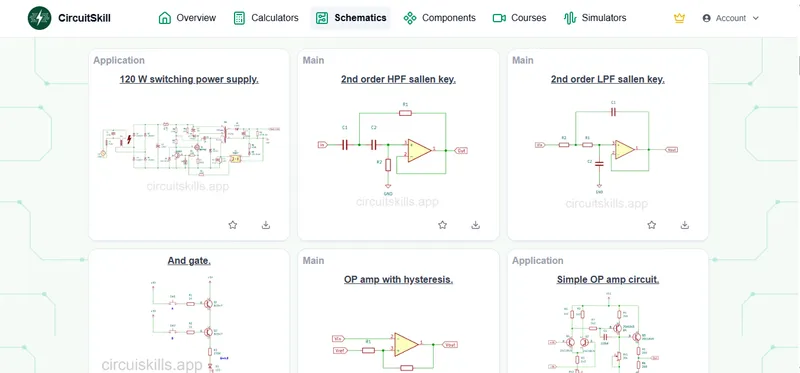
CircuitSkill is a browser-based electronics learning platform that pairs a library of 200+ schematics with analog and Arduino/ESP32 circuit simulation, so you can study a circuit and watch its voltages, currents and waveforms respond without installing software.
What is CircuitSkill?
CircuitSkill is an online platform for learning electronics built around a schematic library and an in-browser simulator. You pick a circuit from the 200+ schematics — or assemble your own resistor networks, filters, amplifiers and transistor stages from resistors, capacitors, diodes, transistors and op-amps — and the simulator outputs real-time voltage, current and waveform visualizations. It runs entirely in a web browser on desktop or mobile with no installation, and the same account also gives you downloadable schematics and eBooks to keep. The site is published at circuitskill.com.
What makes CircuitSkill stand out?
- 200+ schematics sorted by category — Power supplies, Amplifiers & audio, Filters & oscillators, Sensors & measurement, Arduino projects and ESP32 projects, with named entries such as the LM317 adjustable regulator, buck and boost converters, common emitter and common collector amplifiers, and RC low/high pass filters.
- Analog simulation in the browser — build resistor networks, filters, amplifiers and transistor stages from resistors, capacitors, diodes, transistors and op-amps; changing one component value updates voltages, currents and waveforms instantly.
- Arduino and ESP32 project simulation — microcontroller builds with sensors, LEDs and displays can be simulated to see how code and hardware interact before wiring anything.
- 30+ electronics calculators — numeric tools for routine design work, positioned as a way to catch arithmetic mistakes.
- Three hours of free video courses — structured on-demand lessons running from basics to advanced concepts.
- Six downloadable eBooks — including one dedicated to essential formulas; the files are downloaded and kept permanently.
- Component database — basic components, microcontrollers, Arduino boards and popular integrated circuits listed for reference.
- ChatGPT integration — an in-site entry point for asking ChatGPT to break down a schematic or a calculator step by step.
Who should use CircuitSkill?
- Students and self-taught beginners: work through a rectifier or amplifier schematic, simulate it, and see the waveform that a textbook only describes.
- Electrical engineers and technicians: sanity-check a regulator, converter or filter stage in the simulator before committing to a breadboard build.
- Arduino and ESP32 hobbyists: test sensor, LED and display projects in software first so wiring errors surface in the browser rather than on hardware.
- Anyone building a reference library: download schematics and the six eBooks for offline study and keep them for future projects.
Use cases
- Electronics students: open a half-wave or full-wave rectifier or a voltage divider, simulate it, and adjust component values to see how the output responds.
- Arduino hobbyists: simulate a project with sensors, LEDs and displays to confirm how the sketch and the circuit interact before buying parts.
- Designers checking a power stage: study the LM317 adjustable regulator, dual output supply or simple inverter schematics and watch currents and voltages in real time.
- Offline learners: download schematics and eBooks so study material stays available without a connection.
How does CircuitSkill work?
- Choose a schematic from the library by category, or start from a blank analog circuit.
- Simulate it: change a component value and watch voltages, currents and waveforms update in real time.
- Cross-check the numbers with the 30+ calculators, ask ChatGPT for a step-by-step breakdown, or follow a video course.
- Download the schematics and eBooks to keep for offline use.
Pricing
CircuitSkill is a one-time paid purchase, not a subscription. Full access is listed at $19.99 against a $39 limited-time price and includes lifetime access to the 200+ schematics, the downloadable resources and the online simulator. The three hours of video courses are marked as free.
FAQ
Does CircuitSkill need to be installed?
No. The simulator is 100% online and runs directly in a browser on desktop or mobile, so there is nothing to download or install before you start simulating circuits and opening schematics.
Can I simulate Arduino and ESP32 projects, or only analog circuits?
Both. CircuitSkill simulates analog circuits (resistors, capacitors, diodes, transistors, op-amps) and microcontroller projects such as Arduino and ESP32 builds with sensors, LEDs and displays, showing how signals and components behave in real time.
What is inside the schematic library?
A collection of 200+ popular and professional schematics sorted into six categories, including power supplies, amplifiers and audio, filters and oscillators, sensors and measurement, Arduino projects and ESP32 projects.
Can I keep the schematics and eBooks?
Yes. Schematics and the six eBooks are downloadable, so you can study them offline and keep them as a personal reference library for your own projects.
Is CircuitSkill a subscription?
No. It is a one-time payment of $19.99 that grants lifetime access to the schematic library, downloadable resources and the online simulator — there is no recurring subscription charge.


