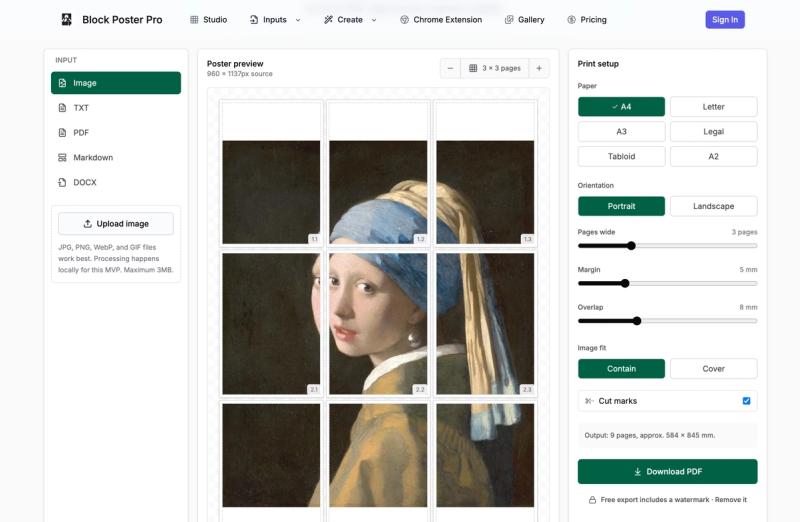
Block Poster Pro is a browser-based block poster maker that converts images, PDFs, TXT, Markdown, and DOCX files into a ready-to-print PDF split across ordinary sheets of paper.
What is Block Poster Pro?
Block Poster Pro is a web tool that creates tiled block posters for home and office printers. It accepts JPG, PNG, WebP, GIF, PDF, TXT, Markdown, and DOCX inputs, then exports a multi-page PDF where each page shows one tile of the final poster. The tool runs entirely in the browser, so source files are processed locally rather than uploaded to a server. The guide and site are by Felix Liu.
What makes Block Poster Pro stand out?
Block Poster Pro focuses on making the tiled poster process predictable. The page count is visible before export, each tile has a clear position, and the final PDF is designed for normal printers. Key specifics:
- Paper-aware tiling — The grid responds to actual paper proportions for A4, Letter, A3, Legal, Tabloid, and A2, so each layout is visibly different before export.
- Margins and overlap controls — Set the margin your printer needs and add overlap (duplicate image area) to make trimming and alignment more forgiving.
- Cut marks and labels — Cut marks provide visible trim guides, and row/column labels identify each sheet's position during assembly.
- Contain or cover fit — Contain keeps the entire image visible; Cover fills the poster area and may crop the image for edge-to-edge impact.
- Multiple input formats — Beyond images, focused workflows exist for PDF, TXT, Markdown, and DOCX documents.
- Browser-first privacy — The image workflow is processed in the browser, so your source never has to be uploaded.
- Live preview — See the page count and tile positions before export with a preview that shows each row and column.
Who should use Block Poster Pro?
- Teachers and educators — Create classroom wall displays, science fair boards, and timetable posters from ordinary A4 or Letter sheets.
- Event organizers — Make party signs, event banners, and temporary wayfinding signs without waiting for a print shop.
- Students and dorm residents — Turn photos into large wall art for dorm room decor using a normal home printer.
- Retail and office teams — Produce window graphics, mood boards, and process diagrams for shared spaces with control over paper size and overlap.
What can you do with Block Poster Pro?
- Teachers: Print a large classroom map across 4-6 A4 pages, with row/column labels for easy assembly.
- Event planners: Turn a party photo into a 3x3 page poster on Letter paper, using overlap to simplify trimming.
- Maker spaces: Convert a PDF or Markdown reference guide into a wall-mounted tiled poster for shared workshop use.
- Small businesses: Create temporary window signage or retail displays from an image, choosing Tabloid or A3 to reduce the number of sheets.
How does Block Poster Pro work?
The workflow has four steps: 1) Choose a source image (JPG, PNG, WebP, or GIF). 2) Choose paper size and set how many pages wide the poster should be. 3) Tune print details (margin, overlap, contain/cover, cut marks). 4) Download the PDF and print at actual size with scaling disabled.