BankGPT is an AI-powered financial automation platform that extracts, generates, and analyzes data from bank statements, invoices, and receipts, eliminating manual data entry for banks, enterprises, and accountants.
What is BankGPT?
BankGPT is a web-based platform that takes as input financial documents such as PDFs, scanned images, Excel files, or even photographs of invoices and receipts. It outputs structured data in JSON or CSV format, ready for export to accounting software like QuickBooks, Xero, SAP, Oracle NetSuite, Zoho Books, or Microsoft Dynamics. The platform is developed by BankGPT and runs entirely in the browser with bank-grade encryption and compliance with GDPR and SOC 2.
Key Features
- Bank Statement Generator & Converter — Automatically extracts transactions, balances, account numbers, and dates from PDF or scanned bank statements, outputting machine-readable data for reconciliation or reporting.
- AI Invoice Generator — Creates professional invoices from extracted data or manual input, with customizable templates and automatic tax/currency rules. Exports as PDF with structured metadata. Try the AI Invoice Generator.
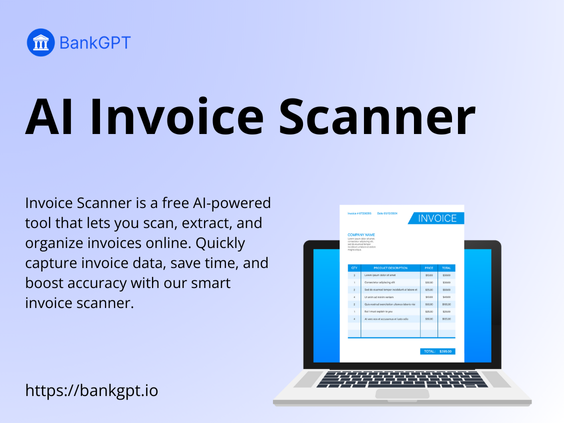
- AI Invoice Scanner — Scans invoices in multiple formats (PDF, JPG, PNG) and extracts vendor details, invoice numbers, dates, line items, totals, and taxes. Outputs JSON or CSV. See the AI Invoice Scanner.
- Receipt Scanner & Manager — Automatically categorizes expenses, detects vendors, and extracts amounts and payment methods from receipts, making them searchable and audit-ready.
- Contract Review & Risk Detection — Identifies key terms, obligations, renewal dates, and risk clauses in financial contracts, producing a clause summary with risk highlights.
- Compliance Checking — Checks documents and customer data against AML, KYC, GDPR, SOX, and internal banking standards, flagging inconsistencies and generating compliance-ready reports.
- Bulk Processing — Upload thousands of documents at once and receive structured outputs within minutes, ideal for large-scale operations.
- Bank-Grade Security — End-to-end encryption, role-based access control, zero data retention, and full regulatory compliance.
Who is it for?
- Banks & financial institutions — Verify customer bank statements for loan applications, credit checks, or compliance audits, reducing turnaround times.
- Accounting & bookkeeping firms — Automate data entry and categorization for multiple clients, speeding up reconciliation and reducing errors.
- Enterprises with high document volume — Process thousands of invoices and receipts monthly with bulk scanning and extraction, improving financial visibility and cutting overhead.
- Small & medium businesses — Scan receipts and invoices effortlessly to simplify expense tracking and tax preparation without hiring additional staff.
- Auditors & compliance teams — Validate financial documents with structured, consistent outputs that meet regulatory standards.
- Loan officers & credit analysts — Quickly evaluate applicants’ bank statements, extract transaction histories, and flag inconsistencies for faster credit decisions.
What can you do with BankGPT?
- Generate professional invoices — Use the AI Invoice Generator to create accurate invoices from scanned data or manual input, complete with tax calculations and PDF export.
- Extract data from scanned invoices — Upload a photo or PDF of any invoice to the AI Invoice Scanner and receive structured fields like vendor, amount, and due date.
- Analyze bank transactions — Convert a bank statement PDF into a clean CSV with transaction-level data for reconciliation or financial analysis.
- Review contracts for risk — Upload a contract to the Contract Analyzer to identify obligations, penalties, and renewal dates, outputting a risk-scored summary.
- Audit compliance — Run KYC/AML checks on customer documents and receive a report with flagged issues and recommended actions.
- Automate workflows — Use the drag-and-drop Workflow Automation Builder to create approval chains for invoices, onboarding documents, and compliance reports.
How does BankGPT work?
Upload financial documents directly to the web app. BankGPT’s AI processes them in seconds, extracting key data and presenting it in structured tables. You can review, correct, and export the output or integrate it via API into your existing systems. Bulk processing allows uploading thousands of files at once.
Pricing
BankGPT offers a free trial. Additional pricing details are available on the official website.
FAQ
Is BankGPT free to use?
Yes, BankGPT offers a free trial so users can test features like statement extraction, invoice processing, and receipt management before subscribing.
What document formats does BankGPT support?
BankGPT works with PDFs, scanned images (JPG, PNG), Excel files, and more. Its AI models handle diverse layouts without requiring manual templates.
Can BankGPT integrate with my accounting software?
Yes, BankGPT integrates with QuickBooks, Xero, SAP, Oracle NetSuite, Zoho Books, and Microsoft Dynamics.
How accurate is BankGPT?
BankGPT uses advanced machine learning fine-tuned for financial data, achieving higher accuracy than traditional OCR tools. It continuously improves through user corrections.
Does BankGPT support bulk processing?
Absolutely. BankGPT can process thousands of bank statements, invoices, or receipts at once, making it ideal for enterprises and banks with large-scale document workflows.