AI Comic Studio is a web-based comic generator that turns a character idea, an art style, and a short story twist into a complete multi-panel comic page with consistent characters and ready-to-publish layouts.
What is AI Comic Studio?
AI Comic Studio is a browser-based comic generation tool that lives on the Animal Generator platform (animalgenerator.net) and is part of the Magic Animal Creator site. It takes a character description (or uploaded reference), one of 21 layouts, one of 12 art styles, and an optional story twist or genre, then outputs a high-resolution comic page with coherent panels. You must sign in to generate comics, and each generation consumes 5 credits. The page is exclusively web-based—no desktop app or mobile app is mentioned.
Key Features
- Smart Layout Engine — Choose from 21 pre-set grids (Full Splash, Classic 4-Koma, Dialogue Stack) that know which panels are for action and which for reaction.
- Style Transfer Technology — Apply 12 art styles including Vintage, Majestic, and Cyberpunk while keeping the character recognizable.
- Auto-Story Generation — An embedded Gemini AI acts as a director, expanding a genre or Story Twist into scene-by-scene visual direction.
- Character Locking — Solves the biggest pain point in AI art—inconsistent faces—by using Visual Character Analysis to inspect anatomy, clothing, and features, then locking identity across panels.
- High-Fidelity Mode — The Ultra quality tier adds extra polish to shading, edges, and lighting for professional-grade output.
- Reference Image Injection — Upload an image to influence a character's appearance, in addition to text descriptions.
- Multi-Panel Coherence — Panels share context so poses, lighting, and framing feel like one continuous sequence.
Who is it for?
- Webtoon and manga creators — Prototype storyboards or full episodes while keeping characters consistent across panels.
- Educators and parents — Help students visualize creative writing assignments with a safe, easy comic workflow.
- Content marketers — Turn blogs or tweets into engaging visual narratives with a mascot that stays on-model.
- D&D and RPG players — Visualize campaign highlights and generate last night's session as a shareable comic page.
- Professional storyboarders — Translate scripts into paced layouts with consistent characters and camera angles.
Use cases
- Indie comic artists: Type a character concept and a story twist, pick the Classic 4-Koma layout and Majestic style, and get a ready-to-publish strip with AI-written dialogue.
- Teachers: Convert a student's creative-writing assignment into a visual comic page for class, using the safe workflow and parental oversight.
- Marketing teams: Use Reference Image Injection to keep a company mascot on-model while turning a blog post into a multi-panel social media comic.
- RPG groups: Select the Cyberpunk style and a genre like heist gone wrong to turn a campaign session into a shareable comic.
How does AI Comic Studio work?
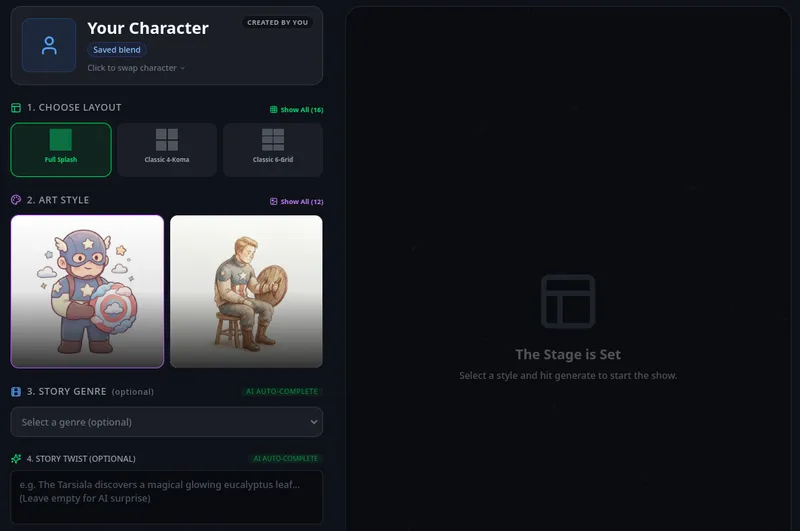
The studio walks you through four steps: (1) Set the Stage — choose a layout (Full Splash, Classic 4-Koma, Dialogue Stack) and define your character via description or reference image; (2) Define the Aesthetics — pick one of 12 art styles; (3) Direct the Narrative — add a Story Twist or choose a genre, and the embedded Gemini AI writes the script; (4) Production — select a quality tier (Fast/Pro/Ultra) and click Generate. The system renders the comic using a Nano Banana Rendering Core tuned for sharp lines and vibrant colors.
Pricing
AI Comic Studio is freemium. To generate a comic you must be signed in and spend 5 credits. Three quality tiers are available: Fast (Draft) — quick, text-driven with no fixed character; Pro (Standard); and Ultra (Best). The page does not give dollar amounts or explain how to obtain additional credits beyond the initial 5-credit cost.
FAQ
Is AI Comic Studio free?
AI Comic Studio is freemium. You must create an account and sign in before generating. Each comic generation uses 5 credits; the page does not specify a free allowance or how to buy more.
How do I generate a comic?
Select a layout and define your character, choose an art style, enter a story twist or pick a genre, decide on a quality tier (Fast, Pro, Ultra), then click Generate. The AI writes the script and renders the page automatically.
Can I keep characters consistent across panels?
Yes. Character Locking uses Visual Character Analysis to inspect your reference or description, then keeps faces, outfits, and proportions stable from panel to panel. Adaptive Style Transfer also lets you change styles mid-session without losing identity.
What layouts and styles does AI Comic Studio offer?
The page lists 21 layouts, including Full Splash, Classic 4-Koma, and Dialogue Stack, and 12 art styles such as Vintage, Majestic, and Cyberpunk. The library is described as growing, with no exact counts for styles beyond the 12 shown.
Do I need drawing skills or prompt engineering?
No. The studio is promptless: you pick a layout, genre, and style, and the AI Director (based on Gemini) writes the narrative and translates genre selections into visual descriptions automatically. No prompt writing is required.
Start creating
You can launch the studio directly at animalgenerator.net/comic-studio.