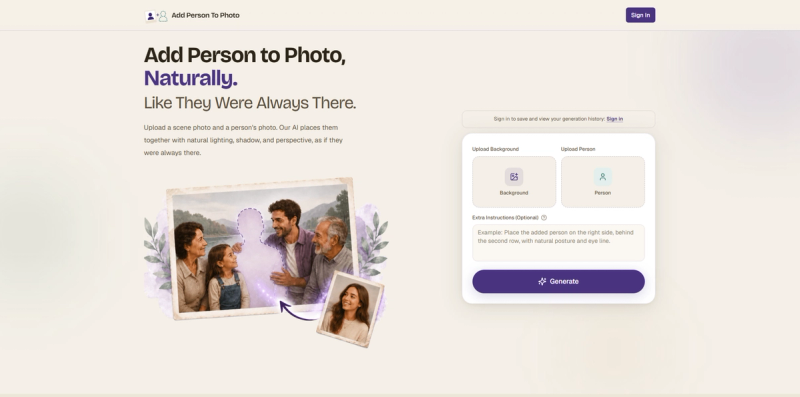
Add Person to Photo is a web-based AI tool that lets you add a person into any photo with natural lighting, shadow, and perspective, as if they were always there.
What is Add Person to Photo?
Add Person to Photo is an AI-powered online service that takes two photos as input — a background scene and a portrait of a person — and produces a seamlessly blended composite image. The tool runs entirely in the browser (no software install) and is developed by the team behind add-person-to-photo.com. It supports input formats JPG, PNG, and HEIC up to 4K resolution, and outputs high-resolution PNG or JPG files.
Key Features
- Natural blending — AI matches lighting direction, shadow softness, color temperature, and skin tone of the original scene, producing composites that pass close inspection.
- Privacy-first — Uploaded photos are automatically deleted within 7 days and are never used for AI training or shared with third parties.
- Fast processing — Composites are generated in under two minutes, with a real-time queue and no account required to try.
- Extra instructions — An optional text field allows users to specify placement (e.g., "left side, behind front row"), natural interactions (e.g., "arm around shoulder"), artistic style matching (e.g., "oil painting, black-and-white"), or depth and scale control ("foreground, same scale as nearest person").
- Easy export — Preview the result, then download as PNG or JPG at the original aspect ratio, ready for messages, social posts, or printing.
- Credit-based pricing — One-time credit packs never expire: 30 credits for $9.90, 150 credits for $29.90 (most popular), or 750 credits for $49.90.
Who is it for?
- Families missing a member — Add a deceased grandparent into a wedding photo or a traveling parent into a reunion portrait.
- Event organizers — Complete group shots when a colleague was on a call or a friend got stuck in traffic, avoiding retakes.
- Travelers — Drop a partner or friend into a scenic landscape shot they missed because they were behind the camera.
- Pet owners — Bring a dog or cat into a family photo, with realistic ground shadows and gaze direction.
- Creative hobbyists — Insert friends into Renaissance paintings or any artistic image for fun, with style matching.
What can you do with Add Person to Photo?
- Reunite a missing dad — Upload a golden-hour porch family portrait and a reference photo of the father; AI places him back into the group with matched lighting.
- Honor a late grandmother — Combine an indoor three-generation portrait with a grandmother's photo to create a complete family keepsake.
- Add a friend who missed the trip — Use a Santorini cliff scene and a friend's portrait to generate a travel photo where everyone appears together.
- Complete a team photo — Add the absent colleague to the end of a row with correct scale and position.
- Drop yourself into the trip — Place a partner leaning on a scenic European bridge railing, matching the original perspective.
- Bring the dog into the picture — Insert a golden retriever onto a beach blanket beside the owner, with natural ground shadows.
- Just for fun — Place a modern person into a Renaissance oil painting, with the AI adapting color palette and texture.
How does Add Person to Photo work?
- Upload the scene — Drop in the photo missing someone (JPG, PNG, HEIC up to 4K).
- Upload the person — Provide a clear portrait of the individual to be added.
- Download in HD — In under two minutes, the AI returns a natural composite with matched lighting, shadow, and perspective, ready to save or share.
Pricing
Add Person to Photo uses a one-time credit pack model with no subscription. Credits never expire:
- Basic — $9.90 for 30 credits (try on a few photos)
- Standard — $29.90 for 150 credits (popular for families and events)
- Pro — $49.90 for 750 credits (for studios and power users)
For a limited time, use coupon code ADDME20 at checkout to receive a 20% discount (valid from May 18, 2026 to May 18, 2027).
FAQ
How realistic does the result look?
Very. The model analyzes lighting direction, shadow softness, color temperature, and skin tone of the original scene and matches them on the inserted subject. Most results pass close inspection.
Can I add a person who has passed away?
Yes. The tool is designed for memorial and reunion use, and the AI works from any clear portrait photo.
Do I need any photo editing experience?
No. The entire process is automated: upload, wait under two minutes, download. No manual cutting, masking, or color correction required.
How long does each generation take?
Processing typically takes under two minutes. The queue is real-time and no email waiting is needed.
Can I add more than one person at a time?
The current interface supports adding one person per generation. For multiple subjects, run separate generations on the same scene.
What if the result doesn't look right?
Use the Extra Instructions field to guide placement, interaction, or style. If the issue persists, you can redo the generation using additional credits.
If you have further questions, contact our support team at [email protected].